On this page
- What “free LMS” actually means
- Free LMS plans: where the limits show up
- Open-source LMS: the real cost breakdown
- Free vs open source vs paid SaaS: comparison table
- When a free or open-source LMS is the right choice
- When a paid LMS usually costs less overall
- How to compare total cost of ownership
- A worked example: one trainer, three routes
- Questions to ask before choosing
- A middle path: cloud LMS with your own brand
- Frequently asked questions
A free LMS is rarely free to run. A free plan usually limits learners, features or branding, and a free open-source LMS shifts the costs to hosting, security updates, plugins, a mobile app and the time of whoever maintains it. Neither is a bad choice, but you should compare them on total cost and workload, not on the licence price.
This guide explains the three main routes, which are free plans, self-hosted open-source software and paid SaaS, and where the money and time actually go in each. It also covers the cases where free or open source genuinely is the right answer.
Key takeaways
- “Free” can mean a limited free plan of a commercial product, or free-to-download open-source software you host yourself. They have very different costs.
- Open-source LMS software has no licence fee, but you pay for hosting, maintenance, security, plugins, themes, a mobile app and expert time.
- The biggest hidden cost is usually people: the hours spent setting up, updating and fixing the system.
- Free and open-source options make sense for small pilots, internal training with in-house IT, or teams that need deep customisation and have developers.
- Compare options over two to three years, including your time, before deciding.
What “free LMS” actually means
When people search for a free LMS, they usually mean one of three things:
- A free plan of a commercial LMS. The vendor hosts it, but limits the number of learners, courses, storage or features. Branding often shows the vendor’s name, and payments may carry transaction fees.
- Open-source LMS software. The code is free to download, use and modify under an open-source licence. Moodle, Canvas (open-source edition), Open edX, Chamilo and ILIAS are well-known examples. You or a hosting partner must install and run it.
- A free WordPress LMS plugin. A plugin turns a WordPress site into a course site. The core plugin may be free, while key add-ons such as payments, quizzes or certificates are often paid.
Each route has a real place. The mistake is comparing a “₹0” sticker with a paid subscription without counting what sits behind it.
Free LMS plans: where the limits show up
Free plans are designed to let you try a product and then grow into a paid plan. That is fair, but it helps to know where the limits usually appear:
- Learner or course caps. Fine for a pilot, but restrictive once you have a few real batches.
- Vendor branding. Your academy may show the platform’s logo, domain or app, which matters if you are building your own teaching brand.
- Transaction fees. Some free plans take a percentage of each course sale on top of payment gateway charges.
- Missing features. Live classes, certificates, custom domains, integrations, reports or a branded app are often reserved for paid tiers.
- Data export. Check whether you can export learners, progress and results if you leave.
- Support. Free users typically get documentation and community forums rather than direct help.
A free plan is a good way to test whether a platform suits your teaching style. Before you invest weeks of content-building, read the upgrade path and pricing so you know what growth will cost.
Open-source LMS: the real cost breakdown
Open-source LMS software is powerful and flexible. Large universities and governments run it at scale. But “free software” means free as in freedom to use and modify, not free to operate. Here is where the costs sit.
1. Hosting and infrastructure
You need a server or cloud account with enough CPU, memory and storage for your learners, plus backups, a CDN for video, SSL certificates and monitoring. Costs grow with learners, video storage and the number of people using the system at the same time, such as during a live test.
2. Installation and configuration
Installing the software is the easy part. Configuring roles, enrolment rules, course formats, grading, email delivery, payment gateways and integrations takes real expertise. Many organisations hire a partner or freelancer for this phase.
3. Updates and security
Open-source projects release regular updates, including security fixes. Someone must apply them, test that plugins still work and fix anything that breaks. Falling behind on updates is one of the most common ways self-hosted systems become vulnerable.
4. Plugins, themes and add-ons
Core features rarely cover everything. Payments, attendance, certificates, video conferencing, reports and a modern theme may each need a plugin. Some are free, some are paid, and each adds update and compatibility work.
5. Mobile app
Learners increasingly study on phones. Some open-source projects offer an official app, but publishing a branded app under your own name usually means extra cost, developer work or a paid service, plus store accounts and ongoing updates.
6. Video and live classes
Hosting recorded video yourself costs bandwidth and storage, and protecting it from easy downloading takes extra work. Live classes usually need a separate video-conferencing integration.
7. People and time
This is the cost most buyers miss. Someone has to administer the system, answer “I can’t log in” messages, fix broken enrolments and keep everything updated. If that person is you, every hour spent on the platform is an hour not spent teaching or selling.
Free vs open source vs paid SaaS: comparison table
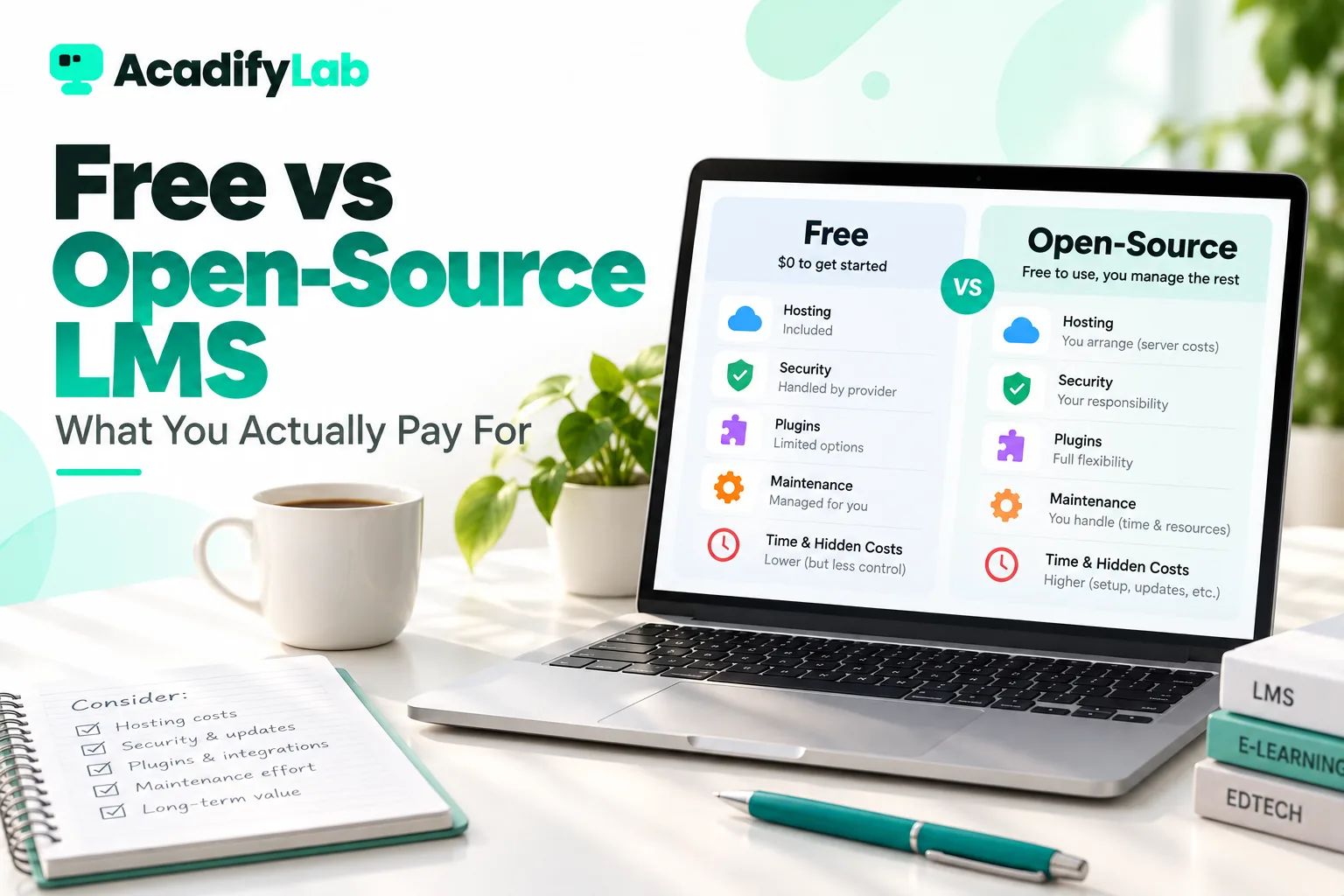
| Cost or factor | Free plan (commercial) | Open-source, self-hosted | Paid SaaS LMS |
|---|---|---|---|
| Licence fee | None, within plan limits | None | Monthly or annual subscription |
| Hosting | Included | You pay and manage | Included |
| Security updates | Vendor | You or your partner | Vendor |
| Setup effort | Low | High | Low to medium |
| Customisation | Limited | Very high, with developers | Moderate, within the product |
| Your branding | Often limited | Full, with effort | Varies by product and plan |
| Mobile app | Vendor app, if any | Extra work or cost | Varies; some offer branded apps |
| Support | Community or docs | Community or paid partner | Vendor support |
| Main hidden cost | Upgrade when you grow | People and maintenance time | Plan upgrades and add-ons |
When a free or open-source LMS is the right choice
Free and open-source options are a smart choice in several situations:
- Testing an idea. If you are not sure learners will pay, a free plan lets you run a small pilot before committing.
- Internal training with in-house IT. If you already have a server team and the training is not a revenue product, open source can be economical.
- Deep customisation. If you need workflows no product offers and have developers to build them, open source gives you full control of the code.
- Academic environments. Universities often have the IT capacity and community connections that make self-hosting sustainable.
- Strict data residency. If policy requires hosting on your own infrastructure, self-hosting may be required. Some commercial vendors also offer private cloud options.
When a paid LMS usually costs less overall
A paid platform often works out cheaper in total when:
- You are a coaching institute or trainer whose time is better spent teaching and selling than administering servers.
- You sell courses and need payments, discount codes and instalments working reliably from day one.
- Your learners expect a polished mobile experience.
- You run live classes and tests at fixed times, when downtime is costly.
- You don’t have a developer, or rely on one freelancer who may not always be available.
How to compare total cost of ownership
To compare fairly, estimate costs over two to three years rather than one month. Use this checklist for each option:
- Licence or subscription at your expected learner numbers in year one, two and three.
- Hosting, storage and video bandwidth, including backups.
- Setup and migration, including content upload and testing.
- Plugins, add-ons and integrations, with their renewal fees.
- Mobile app development, publishing and updates.
- Payment and transaction fees on course sales.
- Administration time, valued at a realistic hourly rate.
- Support, whether a support plan, a retainer or your own time.
- Risk: what an outage during a live class or exam would cost you.
- Exit cost: how easily you could export data and move later.
We explain each of these in more detail in our guide to LMS pricing models and total cost.
A worked example: one trainer, three routes
Imagine an independent trainer who runs two live batches a week, sells three recorded courses and has around 150 active learners. Here is how the three routes play out in practice. No prices are given, because they vary widely by vendor, host and region.
- Free plan: setup takes an afternoon. Within a few months, the learner cap or missing live-class feature forces an upgrade, and the trainer discovers that payments on the free plan carried an extra transaction fee. The move up is easy, but the courses now sit on a platform chosen for its free tier, not for its fit.
- Open-source, self-hosted: a freelancer installs the LMS, a theme and five plugins over two weeks. It works well until a core update breaks the payment plugin two days before a batch starts. The trainer spends the weekend contacting the freelancer instead of preparing lessons. There was no licence fee, but the year includes hosting, plugin renewals, freelancer hours and a few stressful outages.
- Paid hosted LMS: setup takes a few days, mostly content upload. The subscription is a visible monthly cost, but live classes, payments, certificates and updates are the vendor’s job. The trainer’s admin time drops to occasional configuration.
None of these outcomes is guaranteed, and each route can go well or badly. The example shows why the question to ask is “what will this cost me in money and time over two years?” rather than “what does it cost to start?”
Questions to ask before choosing
- Who will maintain the system every week, and what happens when they are unavailable?
- Can learners use it comfortably on a low-cost Android phone with patchy data?
- Can the platform carry your brand, including domain, emails and app, rather than someone else’s?
- What happens to your data and your learners if you stop paying or switch platforms?
- How quickly can you get help during a live class or exam?
If you are still weighing options, our step-by-step framework on how to choose an LMS walks through requirements, trials and rollout.
A middle path: cloud LMS with your own brand
Between a limited free plan and a self-managed open-source install sits the hosted, white-label route. The vendor runs the infrastructure, security and updates, while the academy carries your name. A cloud LMS removes the server work. Custom development is reserved for the parts that truly need it rather than the whole system. For institutes with unusual requirements, custom LMS development on top of an existing platform can be faster than building from scratch.
AcadifyLab takes this route. Live classes, automatic attendance, completion certificates and discount codes are included on every plan, and higher plans add a branded mobile app, SSO and audit logs. Whichever route you choose, compare it on total cost and workload, not on whether the first month says “free”.
See AcadifyLab plans and pricing
Frequently asked questions
Is there a completely free LMS?
Open-source LMS software such as Moodle is free to download and use, but you still pay for hosting, maintenance and often plugins and support. Commercial free plans cost nothing up to a limit, but cap learners, features or branding. Either can work for small or internal projects; very few setups are free to run at scale.
What is the difference between a free LMS and an open-source LMS?
A free LMS usually means a commercial product’s free plan, hosted and controlled by the vendor with usage limits. An open-source LMS is software whose code you can download, modify and host yourself under an open licence. Free plans trade control for convenience; open source trades convenience for control and responsibility.
Is Moodle really free?
Moodle’s software is free and open source, so there is no licence fee. Running it, however, requires a server, regular updates, security monitoring, plugins for extra features, a theme and someone with the skills to manage it. Many organisations pay hosting partners or developers, so the total cost depends on scale and support needs.
What are the hidden costs of an open-source LMS?
The main hidden costs are hosting and video bandwidth, initial setup and configuration, applying security updates, paid plugins and themes, a branded mobile app, and above all the time of whoever administers the system. Outages during live classes or tests, and the effort to migrate later, are also real costs to plan for.
Should a coaching institute use a free LMS?
A free plan can be useful for a short pilot with one batch. Once fees, live classes, tests and parents’ expectations are involved, most institutes benefit from a reliable hosted platform with payments, attendance and their own branding, because downtime and admin work cost more than a subscription. Compare total cost over two to three years before deciding.
Related articles