On this page
- What is an online teaching app?
- Shared online teaching apps: strengths and limits
- Your own branded app: strengths and limits
- Side-by-side comparison
- The middle option: shared app with your branding
- Features that matter more than the app’s name
- Thinking about cost the right way
- Questions to ask before choosing an online teaching app
- Which should you choose? Decision guide by stage
- Switching from a shared app to your own app
- Mobile experience matters more than the label
- Frequently asked questions
Choose a shared online teaching app if you are just starting, have few students and want zero setup. Choose your own branded app when you have a steady student base, want parents to remember your name rather than the platform’s, and care about owning your student relationships and data. Many tutors start on a shared app and move to a branded one once their academy becomes their main business.
This guide compares the two routes fairly, covering branding, student data, fees, discoverability, features and effort, so you can decide which fits your stage.
Key takeaways
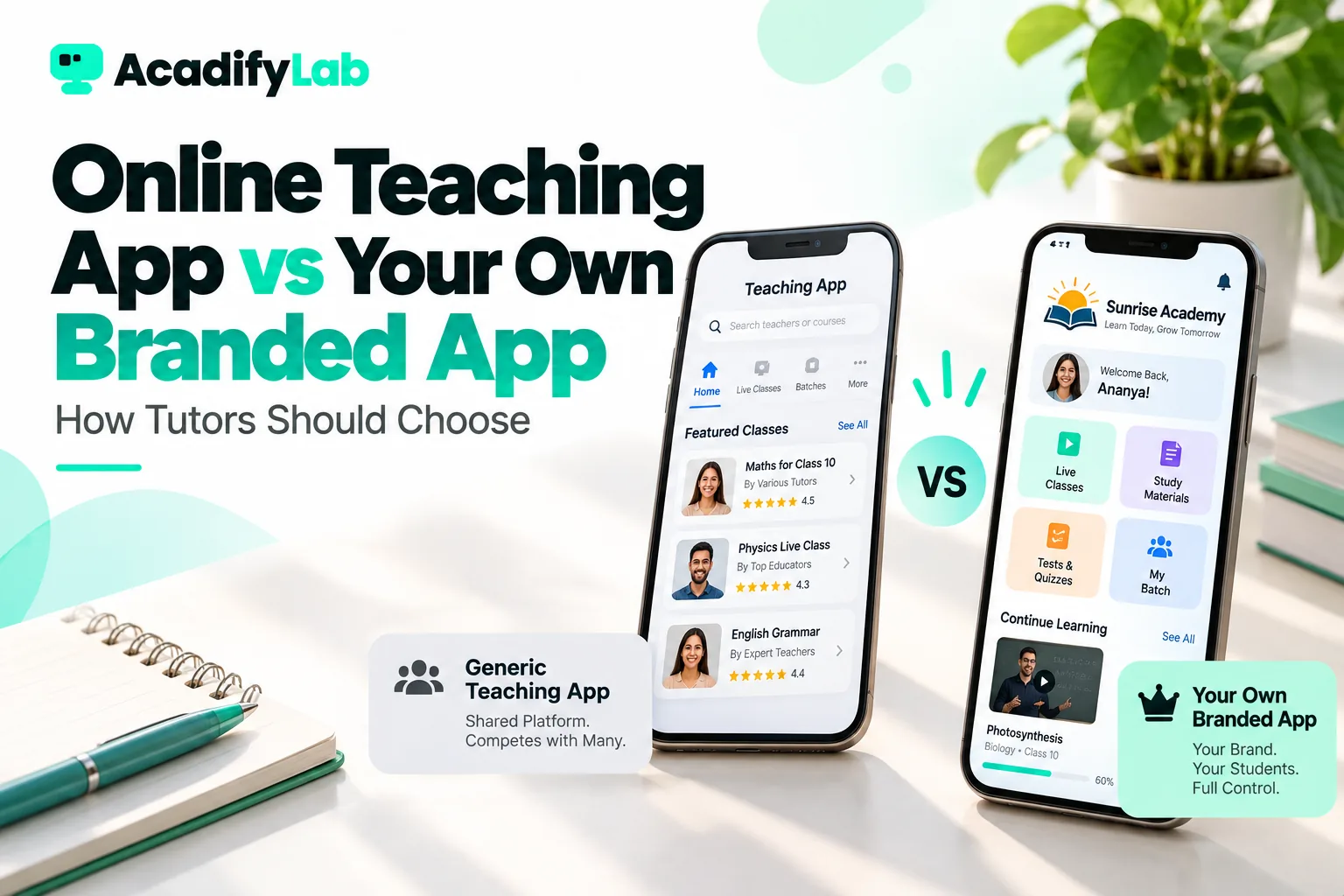
- A shared online teaching app hosts many tutors under the app’s name. A branded app puts your academy’s name and logo on students’ phones.
- Shared apps are faster to start and may bring some discovery, but your brand is secondary to the platform’s.
- Branded apps build long-term recognition and make your academy look established to parents.
- Check who owns student contacts, how fees are collected and whether you can export data before committing to either route.
- The right choice depends on your stage. Switching later is possible but takes planning.
What is an online teaching app?
An online teaching app is a mobile and web application that lets tutors run classes and manage students online. Most offer live classes, recorded lessons, notes, tests, attendance and fee collection. Students and parents install the app, join their tutor’s batch and access everything from their phone.
These apps come in two broad models:
- Shared apps. One app, published under the platform’s brand, hosts thousands of tutors. Students download the platform’s app, then find or join their tutor inside it.
- Branded (white-label) apps. The platform provides the technology, but the app is published with your academy’s name, logo and colours. Students download “your” app.
The core features can be similar. The difference is whose name the student sees and, often, who controls the relationship.
Shared online teaching apps: strengths and limits
Strengths
- Fast start: sign up and start teaching the same day.
- Low upfront cost: many have free or low-cost entry plans.
- No app store work: the platform maintains the app.
- Familiar to some students: students may already have the app installed for another tutor.
- Possible discovery: some apps list tutors in a directory, which can bring enquiries.
Limits
- Your brand is secondary. Parents tell friends “we use [app name]”, not your academy’s name.
- Other tutors are one tap away. On marketplace-style apps, students may see competing tutors in the same app.
- Less control. The platform decides design, features, policies and sometimes pricing rules.
- Data and contact access may be limited, depending on the platform’s terms.
- Fees or commissions on sales can grow significantly as your revenue grows.
Your own branded app: strengths and limits
Strengths
- Brand recognition: your name and logo on the student’s home screen every day.
- Professional image: parents see an established academy, not an individual on someone else’s platform.
- Relationship ownership: students and parents interact with your brand, which makes referrals and re-enrolment easier.
- No competing tutors inside your app.
- Consistent identity across app, website, certificates and notifications.
Limits
- Higher cost than a basic shared plan, because publishing and maintaining a separate app takes work.
- Setup time: app store listing, review and approval can take days to weeks.
- No built-in discovery: you bring your own students through your marketing.
- Store accounts: depending on the provider, you may need your own developer accounts with Google Play and the Apple App Store.
Side-by-side comparison
| Factor | Shared online teaching app | Your own branded app |
|---|---|---|
| Name on student’s phone | Platform’s | Yours |
| Time to start | Same day | Days to weeks for app store approval |
| Upfront cost | Low or free entry plans | Higher; typically on higher plans |
| Discovery | Sometimes a directory | Your own marketing |
| Competing tutors visible | Possibly | No |
| Design control | Limited | Logo, colours, name, sometimes more |
| Student relationship | Shared with platform | With your brand |
| Best for | New tutors, testing demand | Established tutors and coaching institutes |
The middle option: shared app with your branding
Some platforms offer an in-between route: students use a shared app, but your academy’s logo, colours and name appear once they log in. This costs less than a fully separate app and still shows your brand inside the experience, though the app icon and store listing remain the platform’s. It suits tutors who are growing but not yet ready for their own store listing.
AcadifyLab uses this ladder across its plans: the first plan uses the shared app, the second adds your branding inside the shared app, and higher plans include a fully branded app. Whichever provider you consider, ask exactly which of these three levels each plan includes.
Features that matter more than the app’s name
Branding is an important decision, but a branded app with weak features will still frustrate students. Whichever model you choose, check that the everyday essentials work well:
- Live classes inside the app, with a whiteboard, screen sharing, chat and polls, so students don’t need to jump to a separate video tool.
- Recordings of live classes for students who miss a session or want to revise.
- Automatic attendance for live classes, so you know who attended without taking a roll call.
- Tests and quizzes with instant results for objective questions and a clear view of each student’s progress.
- Notes and study material organised by course and chapter, not scattered across chat threads.
- Fee collection with online payments, reminders and instalments for longer courses.
- Notifications for class reminders, new material, test results and fee due dates.
- Certificates on course completion, which matter to adult learners and working professionals.
- Parent visibility into attendance and results for school-age students.
Ask for a demo login as a student and as an admin, and try a realistic week: schedule a class, upload notes, run a quiz and collect a payment.
Thinking about cost the right way
Comparing a free or low-cost shared app with a branded app’s subscription can be misleading. Count the full picture:
- Transaction fees or commissions on every sale, which grow as your revenue grows.
- Add-ons such as live classes, extra storage or more students that may cost extra.
- Separate tools you still need alongside the app, such as a video-call subscription, a payment link service or a website builder.
- Your time spent working around missing features or chasing fees manually.
- Lost referrals when parents remember the platform rather than your academy.
For a small tutor, a shared app is often genuinely cheaper. For an institute with hundreds of students, the arithmetic frequently tips the other way. Our guide to LMS pricing models and total cost explains how to compare fairly over two to three years.
Questions to ask before choosing an online teaching app
Whichever route you lean towards, ask any provider these questions:
- Who owns the student data? Can you export student names, contacts, progress and payment records at any time?
- How are fees collected? Do payments go directly to your account through a payment gateway, or through the platform first? What fees apply on each transaction?
- Can students see other tutors? Is there a marketplace inside the app?
- What does the app look like on a basic Android phone with slow data? Ask for a demo login.
- Are live classes built in, with recordings and attendance, or do you need a separate video tool?
- How is content protected against easy downloading and sharing?
- What is included in the branded app? Name, icon, colours, splash screen, store listing, notifications?
- Who handles app updates when Android or iOS changes?
- What happens if you leave? Can you take your students, content and data with you?
For a deeper checklist of what a branded app should include, read what actually gets branded in a white-label LMS.
Which should you choose? Decision guide by stage
You are just starting (under about 20 students)
A shared app or a simple platform is usually enough. Focus on teaching well, getting results and building referrals. Choose a provider that lets you export your data and upgrade later, so you are not locked in.
You have steady batches and growing referrals
Your name is starting to matter. Consider a platform that shows your branding inside the app and on your website and certificates. This is a good time to formalise fees, tests and parent updates in one system.
You run a coaching institute or multiple batches
A fully branded app usually pays off. Parents and students interact with your institute daily, and your app becomes part of your reputation. Look for live classes, tests, attendance, fee instalments, notifications and reports in one place, and consider how it will scale to new branches. Our page for coaching institutes shows what this looks like in practice.
You sell courses beyond your local area
Your brand is your main marketing asset when students cannot meet you in person. A branded app and website reinforce credibility with buyers who find you online.
A quick self-check
If you answer “yes” to three or more of these, a branded app is probably worth it now: Do most new students come through referrals? Do parents already search for your academy’s name? Do you run more than a few batches at once? Do you plan to add teachers or branches? Would losing access to your student list seriously hurt your business?
Switching from a shared app to your own app
Moving later is common and manageable with planning:
- Export student lists, progress records and content from your current platform.
- Set up your branded platform and upload content before announcing anything.
- Pick a switch date between terms or batches, not mid-way through.
- Tell parents and students early, explaining the benefits, such as one app for everything under your academy’s name.
- Share clear install and login steps, and offer help for the first week.
- Run both for a short overlap if needed, then close the old one.
Our LMS migration checklist covers each step in detail.
Mobile experience matters more than the label
Whether shared or branded, most students in India will learn on a phone, often a budget Android device with variable data. Test any app as a student would: install it on an older phone, join a live class on mobile data, open a PDF, attempt a test and check notifications. A beautiful brand on an app that struggles on real phones will hurt you more than a plain app that works smoothly. See our guide to mobile-first course design for what learners need.
Frequently asked questions
Which app is best for online teaching?
The best online teaching app depends on your stage and goals. New tutors often start on a shared app for speed and low cost. Established tutors and coaching institutes usually benefit from a platform with their own branding, live classes, tests, attendance and fee collection in one place. Test any app on a basic Android phone first.
What is a white-label tuition app?
A white-label tuition app is built and maintained by a technology provider but published under your academy’s name, logo and colours. Students download your app from the store and never see the provider’s brand. You get a professional, branded experience without hiring developers to build and maintain an app yourself.
Can I create my own app for coaching classes without coding?
Yes. White-label platforms let coaching institutes launch a branded app without coding. You provide your name, logo, colours and content; the provider handles development, app store publishing and updates. Check what is included, who owns the store listing and how long publishing takes before signing up.
Are shared teaching apps bad for tutors?
No. Shared apps are a practical, low-cost way to start teaching online and test demand. Their main trade-off is that your brand is secondary to the platform’s and, on marketplace-style apps, students may see other tutors. Many tutors use them early and move to a branded option as their academy grows.
Do students prefer a branded app or a common app?
Students mainly care that the app is easy to use, works on their phone and has everything in one place. Parents, however, often see a branded app as a sign of an established, trustworthy academy. For institutes, a branded app also keeps students focused on your classes rather than other tutors.
Related articles