On this page
- What is a flipped classroom?
- Why the flipped classroom suits coaching institutes
- How to run a flipped classroom: a weekly workflow
- Tips for recording concept videos students will watch
- Introducing the flipped classroom to students and parents
- Sample weekly schedule
- Handling students who skip the pre-work
- When not to flip
- Flipped classroom examples from coaching
- Running a flipped classroom in hybrid and online batches
- Measuring whether flipping works
- Frequently asked questions
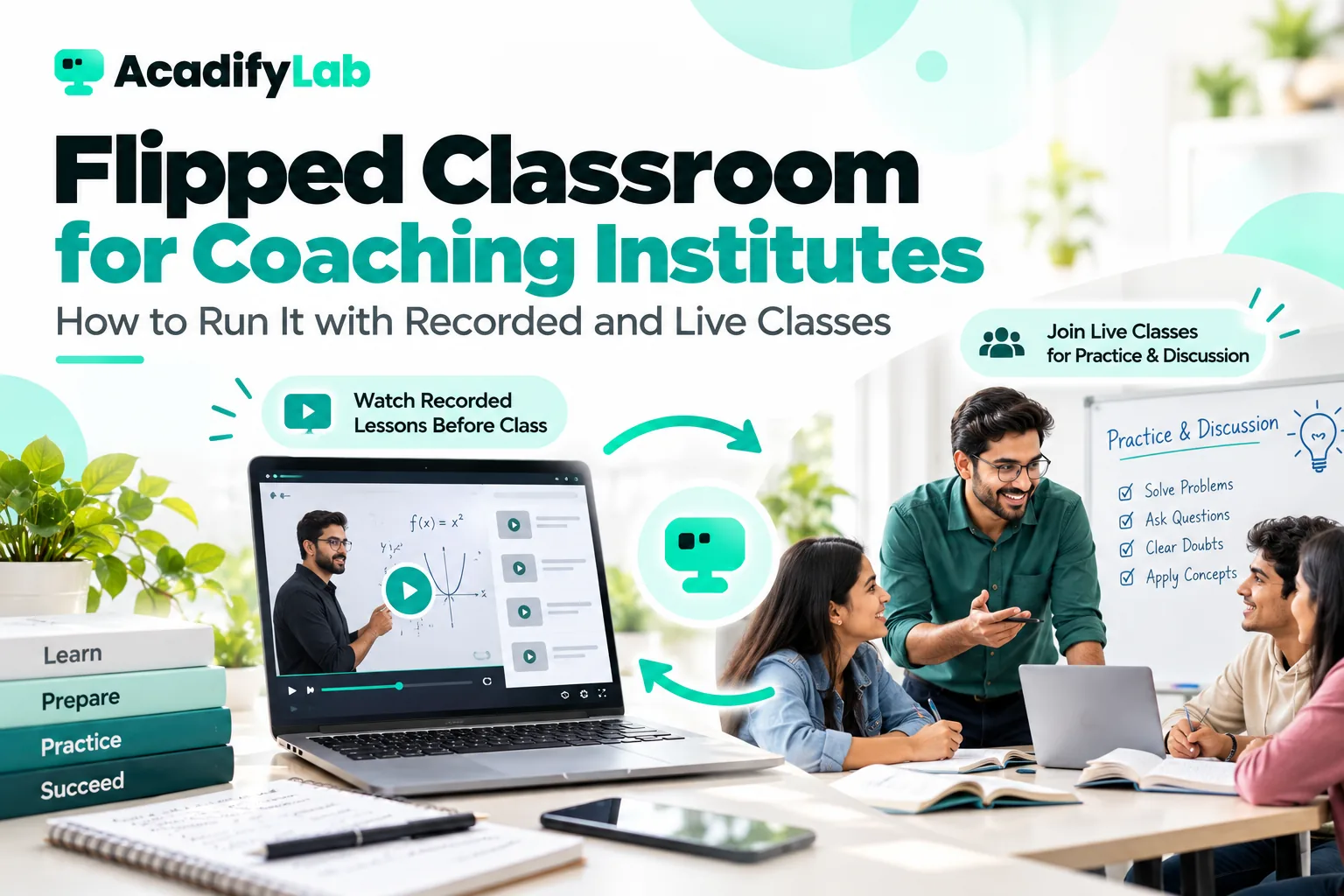
A flipped classroom moves first exposure to new content out of class time and moves practice into it. Students watch a short recorded explanation at home, then use live class time for problem-solving, doubts and discussion with the teacher. For coaching institutes, where students need large amounts of guided practice and the toughest moments come while solving problems, flipping can make every class hour more valuable.
This guide explains how the flipped classroom model works, why it suits coaching, a step-by-step weekly workflow, how to handle students who skip the pre-work, and when you should not flip at all.
Key takeaways
- In a flipped classroom, concept explanations happen before class (usually as short videos) and practice happens in class.
- Coaching suits flipping because the hardest part of learning is applying concepts to problems, where teacher support matters most.
- A quick pre-class quiz shows who watched and what students misunderstood, so live class time can target it.
- Keep pre-class videos short, focused and linked to in-class tasks, or students will skip them.
- Flip selectively. Some topics and student groups still benefit from traditional teaching first.
What is a flipped classroom?
In a traditional class, the teacher explains a concept during class and students practise at home through homework, often alone and stuck on the hardest questions. A flipped classroom reverses this:
| Traditional model | Flipped model | |
|---|---|---|
| Before class | Little or nothing | Short recorded lesson, reading or worked examples |
| In class | Teacher explains; a few examples | Quick check, guided practice, doubt-solving, discussion |
| After class | Homework alone | Consolidation practice, revision |
| Teacher’s role in class | Presenter | Coach and problem-solver |
The idea is not new. Teachers have long asked students to read ahead, but recorded video and learning platforms have made it practical at scale. The term “flipped learning” is often used for the broader approach of designing teaching around active learning in class.
Why the flipped classroom suits coaching institutes
- Practice is the bottleneck. In exam preparation, students rarely fail because they never heard a concept explained. They fail because they cannot apply it under exam conditions. Flipping gives more class time for supervised practice.
- Students learn at different speeds. Recorded explanations can be paused, rewound and rewatched. Faster students move on; slower students review as many times as they need.
- Doubts get solved in the moment. When students attempt problems in class, the teacher sees mistakes immediately rather than discovering them in the next test.
- Your best explanations are reused. A senior teacher’s clearest explanation of a tough topic can be recorded once and used by every batch and branch.
- Revision becomes easier. Students have a library of concept videos to revisit before exams.
How to run a flipped classroom: a weekly workflow
Here is a practical workflow for one chapter taught over a week, for example a physics or maths batch with three live classes a week.
Step 1: Break the chapter into concept units
Split the chapter into three to six concept units, each small enough to explain in a short video. For example, a chapter on laws of motion might become: Newton’s first law and inertia; second law and F = ma; free-body diagrams; third law and action–reaction pairs; friction.
Step 2: Record short concept videos
For each unit, record a video of roughly 6 to 15 minutes covering the concept and one or two worked examples. Keep it focused on one idea. Use a whiteboard or pen tablet, speak directly and avoid long introductions. If you already record live classes, you can edit the best explanation segments into concept videos rather than starting from scratch.
Step 3: Add a quick pre-class check
Pair each video with three to five quiz questions that students complete after watching. The questions should check understanding, not recall of trivia. The results tell you, before class, who watched and which ideas caused confusion.
Step 4: Plan the live class around practice
Use a structure like this for a 60-minute live class:
- Review quiz results (5 minutes): address the most common misconception.
- Warm-up problem (10 minutes): one problem every student attempts, then discuss.
- Graded practice (30 minutes): a set of problems from easier to exam-level. Students work individually or in pairs while the teacher circulates or monitors chat and shared work.
- Doubt clearing (10 minutes): targeted explanations for the problems most students struggled with.
- Exit check (5 minutes): one or two questions to confirm learning before the next unit.
Step 5: Assign consolidation after class
Assign a short practice set and the next concept video. Mixing a few questions from previous chapters into practice sets helps long-term retention.
Step 6: Test at the end of the chapter
A chapter test checks whether students can solve problems independently. Use the results to decide which concepts need a second round, and which students need extra support. Our guide to student assessment strategy for coaching institutes covers how to build this cycle of tests and feedback.
Tips for recording concept videos students will watch
- Start with the problem, not the theory. Open with an exam-style question students cannot yet solve, then teach what they need to solve it.
- Show your face briefly, then the board. A short introduction on camera builds connection; the explanation itself works best on a whiteboard or pen tablet.
- Prioritise audio. A clear voice with no echo matters more than video quality. A simple wired microphone is usually enough.
- Pause with a question. Ask students to stop the video and try a step themselves before you show it.
- Name videos clearly. Use a consistent naming scheme such as chapter, unit number and concept, so students can find them for revision.
- Don’t chase perfection. A clear, slightly imperfect explanation recorded this week is more useful than a polished video next term.
- Keep videos accessible on low data. Many students learn on phones with limited data, so a platform that adjusts video quality helps.
Introducing the flipped classroom to students and parents
Parents who are used to traditional coaching may worry that “watching videos at home” means less teaching. Explain the change clearly before you start: class time will now be spent on more practice and more doubt-solving, the teacher will know before each class where students are struggling, and recordings will be available for revision. Share the weekly routine, how pre-class completion will be tracked, and how progress will be reported. Start with one subject or one batch as a pilot, and share the results with parents after the first month.
Sample weekly schedule
| Day | Before class (home) | Live class |
|---|---|---|
| Monday | Watch unit 1 and 2 videos; complete quiz | Practice on units 1–2; doubts |
| Wednesday | Watch unit 3 and 4 videos; complete quiz | Practice on units 3–4; mixed problems |
| Friday | Watch unit 5 video; revise weak areas | Exam-level problems across the chapter; chapter test assigned |
| Weekend | Chapter test; consolidation practice | Optional doubt session |
Handling students who skip the pre-work
The most common worry about flipping is: “What if students don’t watch the videos?” Some won’t, especially at first. Practical ways to handle this:
- Make videos short and essential. If the in-class practice clearly depends on the video, students quickly learn that skipping it makes class harder.
- Use the pre-class quiz consistently. Track completion and include it in progress reports to students and parents.
- Don’t re-teach the whole video in class. If you do, students learn that the video is optional. Address misconceptions briefly, then move to practice.
- Provide a catch-up station. In offline classes, let students who skipped watch a condensed version at the start while others begin practice. Online, share a two-minute summary.
- Talk to repeat skippers. Find out why: time, data costs, device access or motivation. Some barriers have simple fixes, such as downloadable videos or shorter content.
- Explain the why. Tell students how flipping gives them more help on the problems that matter for exams.
When not to flip
Flipping is a tool, not a rule. It may not suit:
- Very young students who struggle to learn independently from video.
- Completely new, abstract topics where students need interactive explanation and immediate questions from the start.
- Students without reliable device or data access outside class, unless you provide alternatives.
- Batches with very low preparation habits, where you may need to build the habit gradually, starting with one flipped class a week.
- Topics with heavy discussion value where the explanation itself benefits from live debate.
Many institutes take a partial approach: they flip the more straightforward concept units and teach the hardest ones live first, followed by recorded revision.
Flipped classroom examples from coaching
- Maths for competitive exams: students watch a video on a formula and its derivation with two solved examples, then spend class solving progressively harder problems under time pressure.
- Chemistry reactions: students watch a short mechanism explanation, then in class predict products for new reactions in pairs and explain their reasoning.
- English grammar: students watch a rule explanation with examples, then in class correct errors in real sentences and write their own examples.
- Accountancy: students watch a demonstration of a journal entry type, then in class work through a full case with the teacher reviewing entries live.
Running a flipped classroom in hybrid and online batches
Flipping works especially well for online and hybrid coaching, because the recorded concept library serves every mode equally, and live time is spent on interaction rather than one-way lecture. A learning platform keeps the workflow simple: concept videos organised by chapter, quizzes with automatic results, live classes with attendance, recordings for revision and reports showing who completed each step. Our guide to running a hybrid coaching institute with one LMS workflow shows how the pieces fit together, and our coaching institutes page shows how AcadifyLab supports live classes, tests and recordings (recordings are available from the second plan up).
Measuring whether flipping works
Track a few indicators before and after introducing flipped classes in a batch:
- Pre-class video views and quiz completion rates.
- Chapter test scores compared with earlier batches or chapters taught traditionally.
- Number of problems students attempt per class.
- Student feedback on clarity, pace and confidence.
- Teacher observations of the types of doubts raised.
Expect an adjustment period. Students and teachers both need a few weeks to settle into the new rhythm. Judge the approach after a full chapter cycle or two, not after the first class, and adjust video length, quiz difficulty and class structure based on what you see.
Frequently asked questions
What is a flipped classroom in simple words?
A flipped classroom is a teaching approach where students learn new concepts at home, usually through short videos, and use class time for practice, problem-solving and doubts with the teacher. It flips the traditional pattern of explaining in class and practising alone at home, so students get help when it matters most.
What are the benefits of the flipped classroom model?
Students learn concepts at their own pace, rewatch difficult explanations and get more supervised practice in class. Teachers spot mistakes immediately, address misconceptions using pre-class quiz data and reuse their best recorded explanations across batches. It also builds a revision library students can use before exams.
What are the disadvantages of a flipped classroom?
It depends on students completing pre-class work, which some skip, and on reliable devices and internet at home. Recording good videos takes initial effort, and very young students or brand-new abstract topics may need live explanation first. Starting gradually and keeping videos short reduces most of these problems.
How long should flipped classroom videos be?
Keep each video focused on a single concept, typically around 6 to 15 minutes including one or two worked examples. Shorter videos are more likely to be watched completely and are easier to rewatch. If a topic needs longer, split it into several short videos with a quick question between them.
Can coaching institutes use a flipped classroom for competitive exams?
Yes, and it suits competitive exam preparation well, because success depends on applying concepts to many varied problems under time pressure. Recorded concept videos free class time for graded problem sets, timed practice and targeted doubt-solving, which are exactly the areas where students need a teacher most.
Related articles